Client Lead-Alert SMS Consent
Brand: Rosen SystemsAudience: Rosen Systems clients (paying business owners) who check the opt-in boxEffective date: 16th day of November, 2026Public reference: https://rosensystems.io/client-alert-consent
This page shows how Rosen Systems clients opt in to SMS lead alerts and the exact terms that apply once they do. It exists so the consent flow is verifiable from a stable public URL.
Who receives these messages
Only Rosen Systems clients: business owners or designated points of contact at companies that pay for a Rosen Systems service and checked the opt-in box on the setup form. We do not send lead-alert SMS to any phone number that did not opt in.
How consent is captured
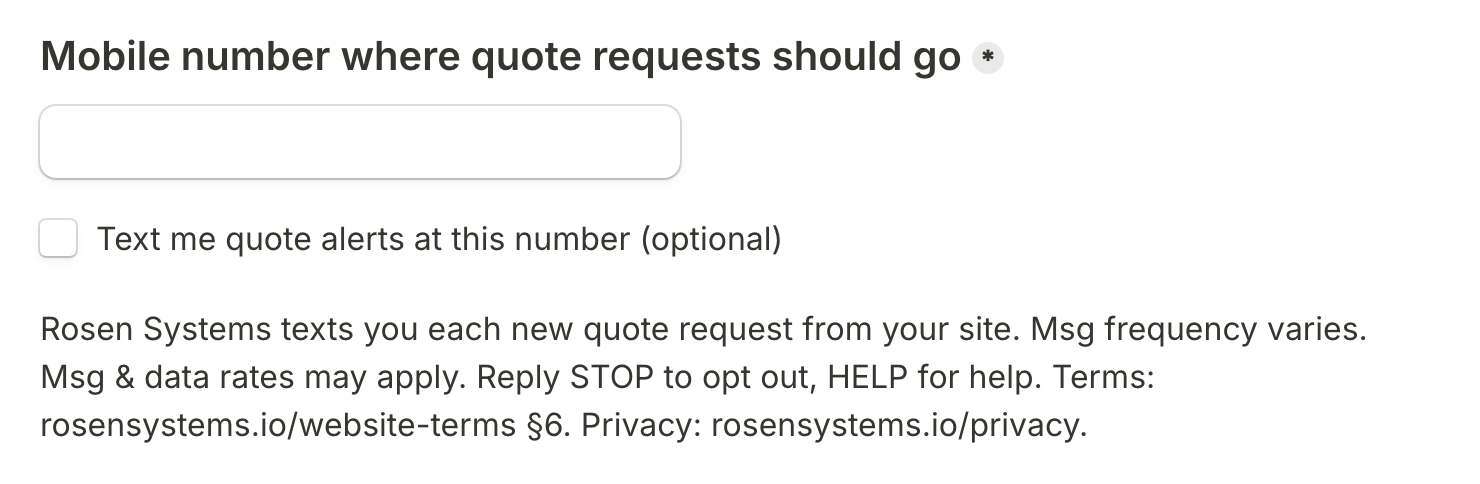
Every new client fills out the Rosen Systems website setup form. Right under the field "Mobile number where quote requests should go" is an optional checkbox, unchecked by default: "Text me quote alerts at this number (optional)". Beneath it the form discloses: "Rosen Systems texts you each new quote request from your site. Msg frequency varies. Msg & data rates may apply. Reply STOP to opt out, HELP for help. Terms: rosensystems.io/website-terms §6. Privacy: rosensystems.io/privacy." Alerts are optional; clients who leave it unchecked get email alerts only.
Checking the box applies section 6 of the Website Service Terms, which contains this clause:
SMS Lead Alerts. Client authorizes Rosen Systems to send transactional SMS notifications to the mobile number Client provides for this purpose, alerting Client each time a new lead submits a form on Client's Rosen Systems–operated website or landing page. Messages identify the sending brand (Rosen Systems), include the lead's name and contact information, and may include a short snippet of the lead's submission. Message frequency varies with the rate of lead activity on Client's site. Standard message and data rates may apply, depending on Client's mobile carrier and plan. Client may opt out at any time by replying STOP to any message; opting out terminates the lead-alert feature but does not otherwise affect Client's services.
The checkbox as it appears on the live setup form:
Sample first message
An example of the SMS alert Rosen Systems sends a client when one of their leads submits a form:
Rosen Systems: New lead for {business} — {name}, {phone}. "{message_preview}". Reply STOP to opt out. Msg & data rates may apply.
Scope and frequency
- Messages are limited to transactional lead-alert content (new lead notifications and operationally adjacent account updates). No marketing, promotional, or unrelated content is sent under this consent path.
- Message frequency varies with the rate of lead activity. A typical client receives anywhere from zero to several messages per day, depending on their site traffic.
- Message and data rates may apply, depending on the recipient's mobile carrier and plan.
- We do not share, sell, or transfer client phone numbers or lead-alert consent records to any third party.
Opt-out and help
Clients can opt out at any time by replying STOP, STOPALL, CANCEL, END, QUIT, UNSUBSCRIBE, OPTOUT, or REVOKE. You will receive one confirmation message and no further lead alerts.
Reply HELP or INFO for help. Our help reply is: "Reply STOP to unsubscribe. Msg&Data Rates May Apply."
You may also email sam@rosensystems.io to be removed from the lead-alert list.
Related
See our Privacy Policy, Terms of Service, and inbound-call SMS Disclosure.